
ihos

Connect ihos

Add live translation to Microsoft Teams, guest phones or tour receivers. We help you check the setup before your first session.

Translation for Teams

Use ihos translation plugins in Microsoft Teams meetings. We help you plan the language pairs and setup for your organisation.

  • Your meeting format
  • Your language pairs
  • A guided setup walkthrough
Explore the Teams setup
Colleagues sharing a conversation around a laptop
ihos
One conversation.EN EL FR
AI-generated illustrative scene. The overlay illustrates language participation, not the Microsoft Teams interface.
01Open the QR link
02Choose a language
03Listen and ask questions

Listen on your phone

Guests join in their phone browser, with no guest app to install. They listen through earphones and can send a spoken question back for translation.

Phone participation needs an internet connection. The guide’s connection powers the cloud translation; allow a short interpretation delay.

Try the guest experience

Tour equipment

Explore OTG-200 and D220 setups for translated group tours. ihos provides the live translation; the guiding system carries the audio.

OKAYO / OmniTourTour equipment
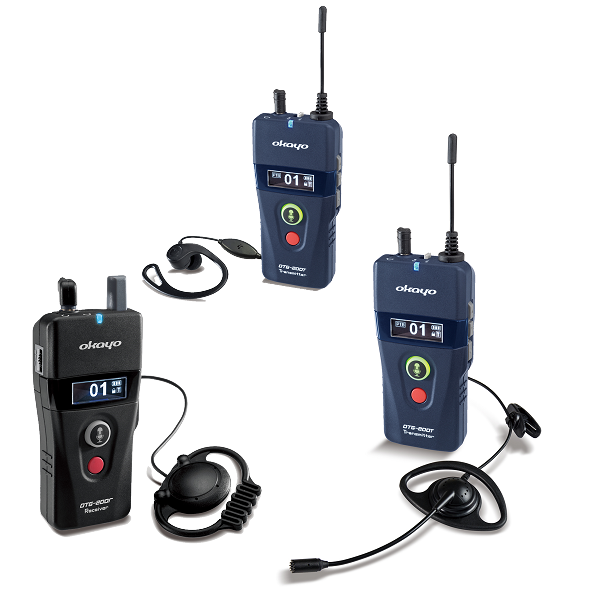
Okayo OTG-200 tour guiding devices and earpieces

OTG-200

+ ihos

Keep the group connected.

A dedicated guiding system with hardware talk-back and group management tools. Explore an ihos setup that carries translated commentary to your guests’ receivers.

  • Group guiding and training
  • Talk-back, roll-call and gathering functions
Explore OTG-200 with ihos Product photo & device details: Okayo
OKAYO / D220Tour equipment
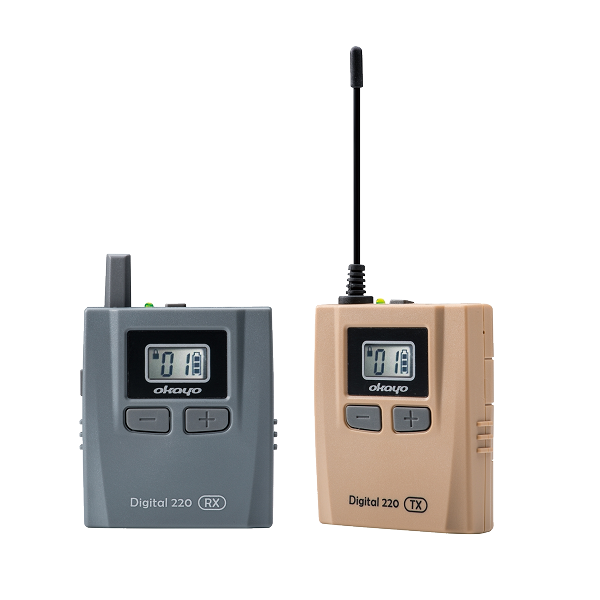
Okayo Digital 220 D220 transmitter and receiver

Digital 220

+ ihos

A compact kit for shared discoveries.

Compact guiding devices with built-in microphones and guide-controlled hardware talk-back. Plan your language channels and ihos translation setup for the way your group travels.

  • Walking tours, visits and group sessions
  • Push-to-talk and guide channel control
Explore D220 with ihos Product photo & device details: Okayo

The translation lives in ihos. The devices deliver it.

  1. 01

    Your guide speaks

    The story starts with a real person.

  2. 02

    ihos translates + routes

    Live translation connects through the ihos hub.

  3. 03

    A channel for each language

    A separate transmitter carries each selected language.

  4. 04

    Guests listen on receivers

    An earpiece. Their language. The same tour.

We confirm the model, connections, language channels and route connectivity with you before a pilot. The guide and hub need internet for cloud translation; receiver listeners do not need a phone or mobile data.

Prefer phones? Or a mix?

Let the group choose how to listen.

Guests can also scan a QR link, listen in their phone browser and ask a question in their language. You can plan phones and receivers for the same group.

Plan my group’s setup

What about questions?

OTG-200 and D220 both support hardware talk-back. That radio feature is separate from a translated return path through ihos. Phone guests can ask translated questions; we can demonstrate that workflow in an arranged product walkthrough. Translated receiver talk-back is checked separately for your setup.

Plan your first session

  1. 01

    Share your plan

    Tell us your group size, languages, route or meeting format, and any equipment you use.

  2. 02

    Test your languages

    Try the listening experience and question flow with the language pairs that matter to you.

  3. 03

    Check the setup

    Agree the setup, check connectivity and confirm the practical details before your pilot.

Plan your setup

Request a demo, a purchase or rental quote, or a compatibility review. Tell us your languages, group size, location and dates. This sends an enquiry; it does not place an order or confirm a booking.

  • Demo length 30 minutes
  • Demo cost No charge
  • What we show Your use case, live
  • We reply Within two working days

For a tour or rental, include languages, location and start–end dates. For a demo, tell us what you would like to try.

Your details and preferences are used to respond to your enquiry.